Saturday, 22 September 2018

Migration to Google Cloud Platform (GCP)
Migration to Google Cloud Platform (GCP)


Image result for migration onprem to google cloud

Our aim was to choose a right cloud platform that would help us build, test, and deploy applications quickly in a scalable, reliable cloud environment. Although all large scale Cloud Platforms may seem similar in many ways, there are several fundamental differences in large scale cloud platforms.
We’re going to split this blog post into 2 parts:
  1. Why we chose to move to GCP
  2. Migrating to GCP without any downtime
Proof of ConceptWe started the process with a POC in which we considered existing running infra compatibilities with services offered by the Google Cloud Platform and also planned for elements in our future roadmap.
Key areas covered in POC:
⊹ Load Balancer
⊹ Compute Engine
⊹ Networking and Firewalls
⊹ Security
⊹ Cloud Resource Accessibility
⊹ Big Data
⊹ Billing
The POC included testing and verifying for VMs/Network/Load Balancer Throughput, Stability, Scalability, Security, Monitoring, Billing, Big Data and ML services. We took the big decision in June 2017 to migrate the entire infrastructure stack to the Google Cloud Platform.
We wanted to opt for a cloud platform that cloud take care of the myriad challenges we were facing:
⊹ Load Balancer:
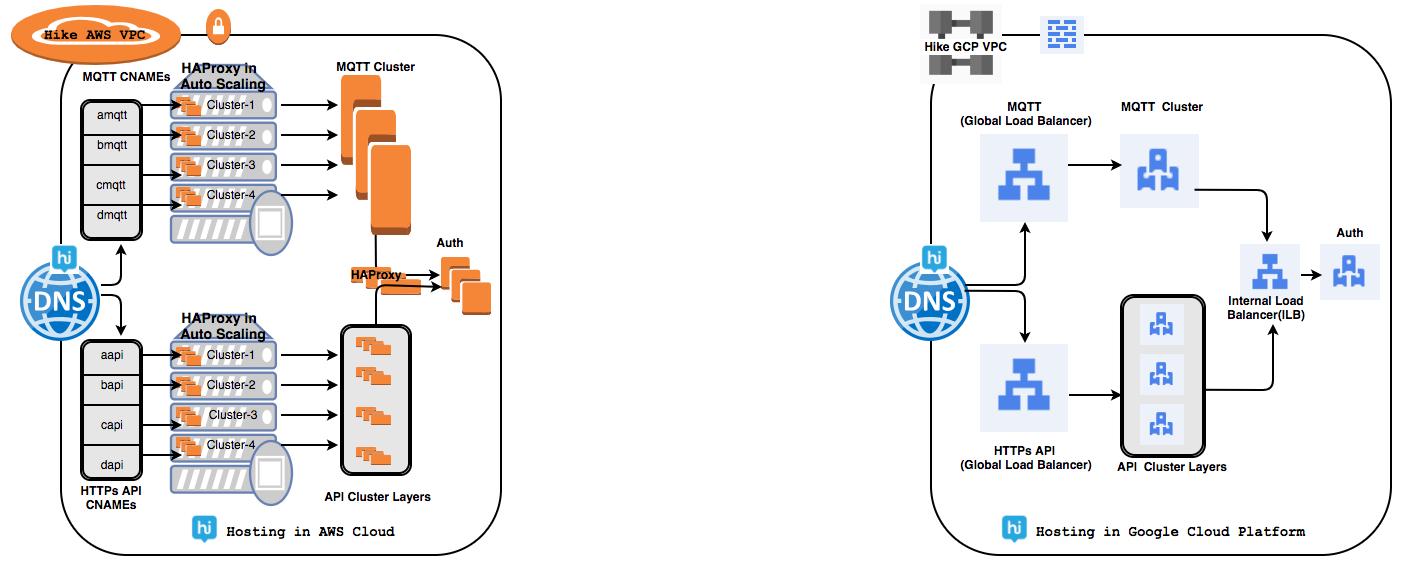
We had faced many challenges while managing HAProxy inhouse clusters to handle a few tens of millions of daily active user base connections. Global Load Balancer (GLB) solved our many challenges.
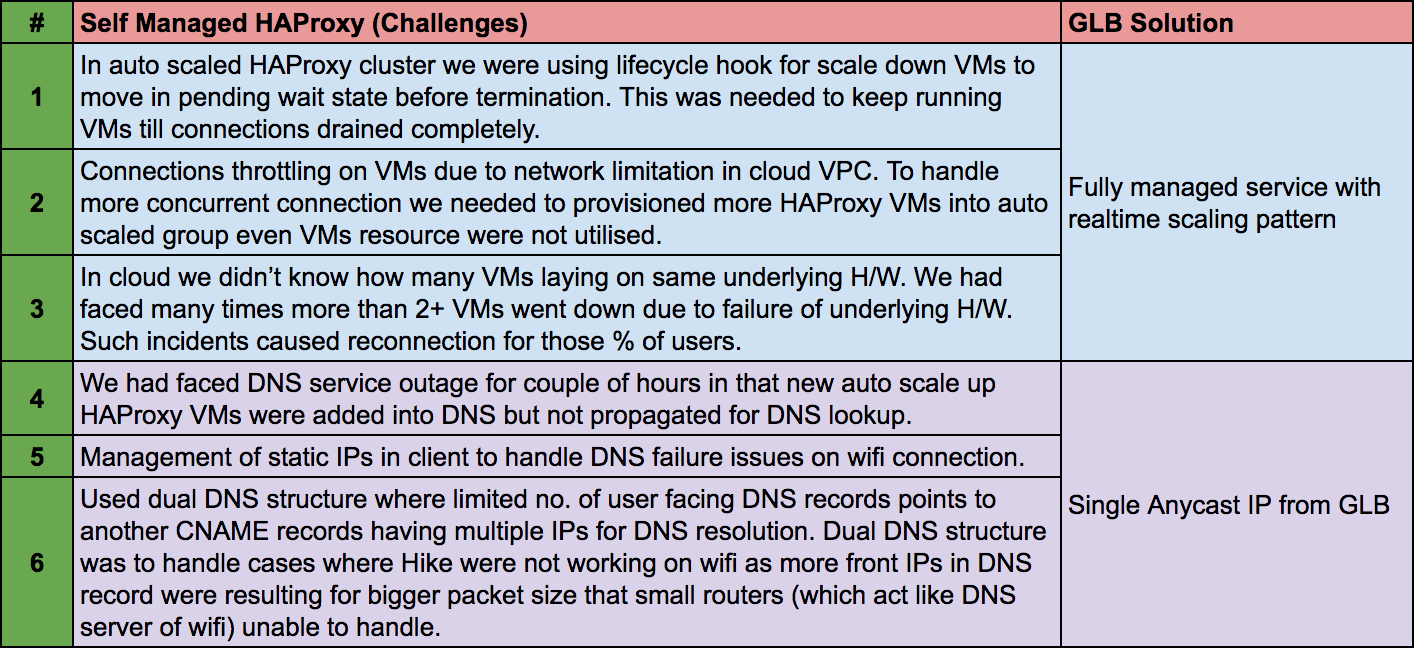
Using GCP’s global load balancing, a single anycast IP can forward up to 1 million requests per second to various GCP back-ends such as Managed Instance Groups(MIG) and it didn’t require any pre-warming. Our overall response time improved to 1.7–2x as GLB’s utilizes a pool implementation that allows for the traffic to be distributed to multiple origins.
⊹ Compute Engine:
There was as such no big challenges in compute engines but we needed a performant platform at a viable cost. Google cloud VMs overall throughput has improved to 1.3–1.5x and thereby helping us to reduce the total number of running VM instances.
Redis benchmark tests were run across a cluster of 6 instances (8 core, 30GB each). From the results below, we concluded that GCP provides up to 48% better performance (on average) for most REDIS operations, and up to 77% better performance for specific REDIS operations.
redis-benchmark -h <hostname> -p 6379 -d 2048 -r 15 -q -n 10000000 -c 100
Google Compute Engine (GCE) services added more values in our infrastructure management using:
● Managed Instance Group (MIG): MIGs help us to keep running our app services in a robust environment with multi-zone features instead of provisioning resource per zone. MIG automatically identifies and recreates unhealthy instances in a group to ensure that all of the instances are running optimally.
● Live Migration: Live migration helps us keep our VM instances running even when a host system down event occurs, like a software or hardware update. With our previous cloud partner, we used to get a schedule event notification for maintenance that forced us to stop and start VM to move on healthy VM.
● Custom VMs: In GCP’s we can create custom VM’s with the optimal amount of CPU and memory for workloads needed.
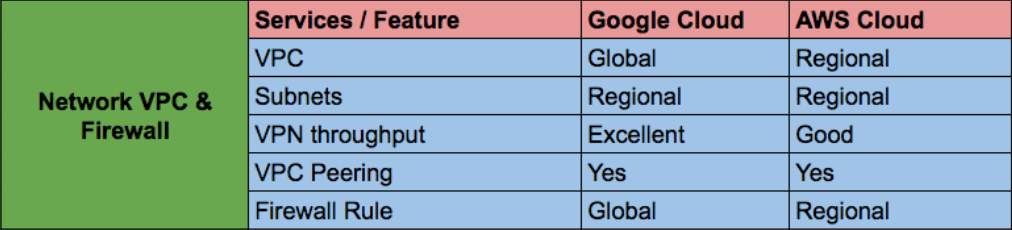
⊹ Networking and Firewalls:Manageability of multiple networks and firewall rules is not easy as this can lead to risk. GCP’s network VPC is global by default and enables inter-region communication with no extra setup and no change in network throughput. Firewall rules gives us flexibility within VPC for across projects using tag rule name.
For low-latency network and higher throughput we had to choose expensive 10G-capable instances and enabled enhanced networking on those instances.
⊹ Security:Security is most important aspect for any cloud provider. In our past experiences, security was either not available or optional to choose for most of services.
Google Cloud services are encrypted by default. GCP uses several layers of encryption to protect data. Using multiple layers of encryption adds redundant data protection and allows us to select the optimal approach based on application requirements. like Identity-Aware Proxy and encryption at rest by default.
GCP’s handling of the recent catastrophic speculative execution vulnerabilities in the vast majority of modern CPUs (Meltdown, Spectre) is also instructive. Google developed a novel binary modification technique called Retpoline which sidesteps the problem and transparently applied the change across running infrastructure without users noticing.
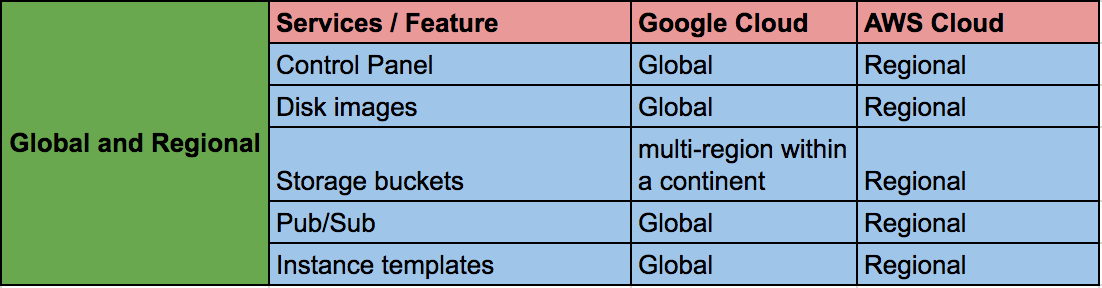
⊹ Cloud Resource Accessibility:GCP’s resource accessibility differs from other cloud providers as in GCP’s most resources, including the control panel, are either zonal or regional. We had to manage multiple VPCs for separate projects from separate accounts which needed VPC peering or VPN connection for private connectivity. We also had to maintain image replica in separate account too.
In Google Cloud most resources are either Global or Regional. This includes things like the control panel (where we can see all of our project’s VMs on a single screen), disk images, storage buckets (multi-region within a continent), VPC(but individual subnets are regional), Global Load Balancing, Pub/Sub etc.
⊹ Big Data:We went from a monolithic, hard to manage analytics setup to a full managed setup with BQ and resulted in 3 key areas of improvement:
● upto 50x Faster Querying
● Fully Managed & Autoscaled Data Systems
● Data Processing down to 15m from hours before.
⊹ Billing:It was tough to compare different cloud providers since many services were not similar or comparable, were different for different use cases, and dependent on unique use cases.
GCP’s advantages were:
● Sustained Use Discounts: Sustained These are applied on incremental VM use when they reach certain usage thresholds. We can automatically get up to 30%-off for workloads that run for a significant portion of the billing month.
● Per Minute Billing: GCE has a minimum slab of 10 minutes after billing per minute of actual VM usage. This provides a significant cost reduction given we don’t have to pay for the entire hour even when an instance runs for less than an hour.
● Superior Hardware, Fewer Instances: For almost all tiers and applications we found that it was possible to run the same workload at the same performance with fewer equivalent instances in GCP.
● Commitment Vs Reservation: One additional factor is GCP’s take on VM instance pricing. With AWS, the main way to cut VM instance costs is buying reserved instances for 1–3 years terms. If workload required change in VM configuration or we didn’t need the instance, we had to sell the instance on the Reserved Instance Marketplace with cheaper rate. With GCP’s, “Committed Use Discount” which is done for CPU and Memory reservation, it does not matter what kind of VM instances we are running.

Friday, 21 September 2018

Google Cloud OnBoard  2018


Learning Cloud has been on my ToDo List for a very long time now. I even bought the trial version of Google Cloud Platform (GCP) but never knew where to start. Luckily, I came across the registration link for Cloud OnBoard. I registered immediately and attended the event on September 18, 2018, in Hyderabad. Read on to know why it was a life-changing experience for me.


The event covered all the widely used Cloud solutions across the industry i.e. compute, storage, big data, and machine learning. Overview, features and technical demonstration for each Google Cloud product were given in order to give an insight of what exactly GCP is capable of. Now that I have an idea about each cloud product available on GCP, I won’t have to research for suitable cloud solutions specific to the requirements of my projects.


I had a lot of expectations from the event and I was not disappointed at all. What I loved the most about the event is Google ensured the attendees get the opportunity to dive deep into GCP by providing various incentives like:
  1. Access to the course, GCP Essentials, on Qwiklabs.
  2. $200 credits in GCP account and waiver on registration fees of Google Cloud Certification upon successful completion of course on Qwiklabs.
  3. Voucher for free access to Kubernetes course on Coursera.
  4. Vouchers from Trainocate worth $100 valid for 6 months.
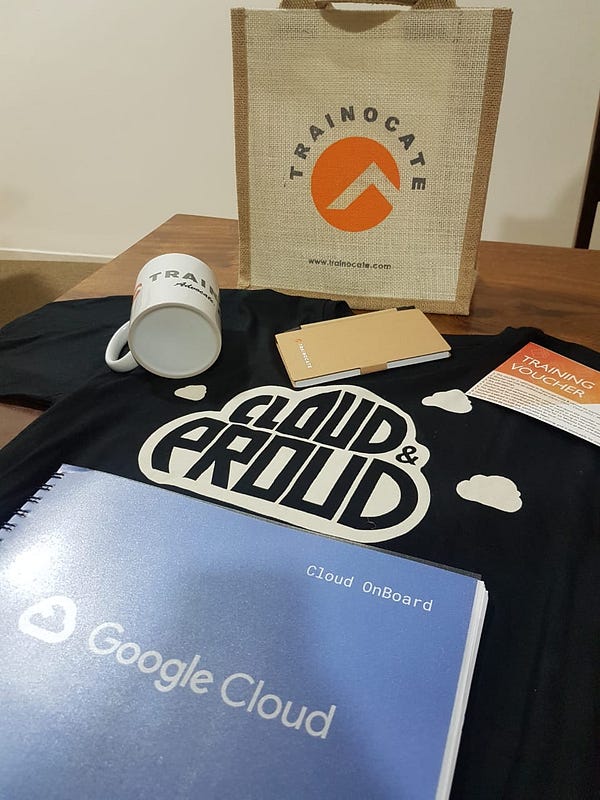
Wow! Google really helped me to get ‘On Board’. And of course, Google events are incomplete without loads of schwags, a cool t-shirt, and tasty food. I must say that deciding to attend the event was fruitful.
If Cloud OnBoard sounded interesting to you and you:
  1. want to learn cloud but don’t know where to start from or, are looking for cloud solutions for the idea/project you’re working on then you can register here.
Just in case you are unable to register for the event, you can still attend the event. There is an on-the-spot registration booth set up just for you! Still, if you are unable to make to the event, don’t get disheartened! You can still access the event’s content here.


Wednesday, 19 September 2018

Introduction to Google Cloud Platform

Introduction to Google Cloud Platform

  1. 1. Introduction to Google Cloud Platform Google Cloud Platform Meetup 

  2. 2. Agenda • 
  3. Why Google Cloud? • Infrastructure underpinning Google Cloud • Components of Google Cloud • Compute Services • Networking Services • Storage Service • Big Data • Machine Learning

  4. 3. Why Google Cloud? “Google Cloud is underpinned by the same infrastructure and innovation that powers Google products” “Google has scaled seven products each of which has over a billion users each, every single day Google handles 1.4 petabytes of information in Gmail alone with 99.97% availability ” “We are at the beginning of what’s possible with the cloud” - Sundar Pichai (GCP Next 16 Keynote)

  5. 4. Why Google Cloud? Google's ability to build, organize, and operate a huge network of servers and fiber optic cables with an efficiency and speed that rocks physics on its heels. This is what makes Google Google: its physical network, its thousands of fiber miles, and those many thousands of servers that, in aggregate, add up to the mother of all clouds" - Wired

  6. 5. Google’s Network Infrastructure Global, meshed fiber backbone network interconnecting data centers with 70+ Edge points of presence in 33 countries with elements within ISP and access networks 
  7. Read More at https://peering.google.com/#/infrastructure https://cloudplatform.googleblog.com/2015/06/A-Look-Inside-Googles-Data-Center-Networks.html http://www.wired.com/2015/06/google-reveals-secret-gear-connects-online-empire/

  8. 6. Compute Services

  9. 7. Compute Engine • Configurable Custom Machine Types • Live migration • Up to 2 GBPS networking between VMs • Instance metadata and startup scripts • HTTP(s) and Network load balancing • APIs for auto-scaling and group management • Sub-Hourly billing, Automatic sustained use discount • Preemptible VMs (Spot Instances)

  10. 8. Container Engine • Kubernetes based Container orchestration • Uses underlying Compute Engine resources • Declarative syntax for orchestration and scheduling Docker containers • Managed Logging, Monitoring, and Scaling

  11. 9. App Engine • Managed runtime for Java, Go, Python, & PHP • Local SDK for developing, testing and deployment • Auto-scaling based on demand • Free daily quota, usage-based billing • 60s Request timeout • Can’t write to local filesystem • Limits on third-party software

  12. 10. Load Balancing • HTTP(S) and Network Load Balancing • HTTP(S) Load balancing and auto-scaling across Compute Engine Regions • Single Anycast external IP, simplifies DNS setup • No pre-warming required, scales to 1 million+ QPS • Policy based Auto-scaling of Instance groups • Network Load balancing for TCP and UDP traffic within a Compute Engine Region • Only healthy instances handle traffic

  13. 11. Cloud DNS • Fully managed, Scalable and Highly Available DNS • 100% availability SLA • Programmatically manage zones and records with RESTful API • Powered by the global network of Anycast name servers • Managed zones for projects • Cost effective pricing tiers

  14. 12. Cloud Storage • Highly scalable immutable object /blob store • Standard variant (HA & low latency) • Durable Reduced Availability variant (Reduced availability) • Nearline Storage for archiving, backup and DR (~3s response) • No capacity planning required • All options accessed through the same API • Can be mounted as the file system using GCS Fuse

  15. 13. Cloud Datastore • NoSQL database that can scale to billions of rows • Fully managed service • Automatically handles Sharding and Replication • Support for ACID transactions, SQL like queries • Fast and Highly Scalable • Local development tools • Access from anywhere through a RESTful Interface • Free daily quota

  16. 14. Cloud Bigtable • Massively scalable NoSQL • For large workload applications - Terabytes to petabytes of data • Low latency and high throughput • Accessed using HBase API • Native compatibility with Hadoop ecosystem • Replicated storage • Role-based ACLs • Encryption of in-flight and at rest data • Used by Google Analytics and Gmail

  17. 15. Cloud SQL • Managed MySQL • Packages and Pay-per-use billing • Second generation Cloud SQL is currently in Beta • Vertical scaling for read and write • Horizontal scaling for read • Seamless integration with App Engine, and Compute Engine • Data is automatically encrypted • Automatic failover for high availability

  18. 16. Big Data Services (Fully Managed) BigQuery Analytics data warehouse Stream data at 100,000 rows per second Dataflow Stream and Batch processing of data Unified programming model Pub/Sub Scalable & Reliable enterprise messaging middleware Dataproc Managed Hadoop, Spark, Pig and Hive at affordable pricing

  19. 17. BigQuery • Fully managed petabyte-scale analytics data warehouse • Near real-time interactive analysis of massive datasets • Based on the columnar structure for performance • SQL like syntax for querying • Scale storage and compute separately • Pay for storage and compute used • Benefit from integration points developed by partners

  20. 18. Dataflow • Unified programming model for developing and executing scalable and reliable data pipelines • Support for ETL, Analytics, Real-time computation, and Process orchestration • Processes data using Compute Engine instances • Open Source Java SDK for developing custom extensions • Benefit from integration developed by GCP partners

  21. 19. Dataproc • Fully managed Hadoop, Spark, Pig, and Hive • Dataproc clusters can be resized at any time, even when the jobs are running • Clusters are billed minute-by-minute • Clusters can use preemptible instances to further reduce cost • Restful API and integration with Google Cloud SDK • Easy to move existing ETL pipelines without redevelopment

  22. 20. Cloud Pub/sub • Scalable and reliable messaging middleware • Based on proven Google technologies • Guaranteed “at least once” delivery with low latency • Supports both pull and push delivery • Fully managed and global by design taking advantage of all GCP regions • Includes support for offline consumers

  23. 21. Cloud Datalab • Interactive tool for large-scale exploratory data analysis and visualization • Based on Jupyter notebook (IPython) • Code, documentation, results, and visualizations all in notebook format • Runs on Google App Engine • Python, SQL, and JavaScript for data analysis • Google charts or matplotlib for visualization • Easy to deploy transformation, analysis models to BigQuery

  24. 22. Cloud Machine Learning • Cloud Machine Learning is currently in Alpha • Fully managed large-scale Machine Learning Platform • Fully managed and Integrated with Cloud Storage and BigQuery • Uses open source TensorFlow framework that powers Google Photos, and Cloud Speech API • Integrated with Cloud Dataflow for pre-processing • Google has built custom Tensor Processing Units for efficiently running Machine Learning • http://venturebeat.com/2016/05/18/google-is-bringing-custom-tensor- processing-units-to-its-public-cloud/ • http://www.infoworld.com/article/3072569/cloud-computing/googles- cloud-strategy-becomes-clearer-with-tensorflow.html

  25. 23. Translate API • Simple API for translating an arbitrary string into any supported language • Programmatically detect a document’s language • Support for dozens of languages • Highly Scalable high-quality translation • Supports Python, Java, Go and etc • You can try it out from API Explorer • Usage and billing calculated per million characters • We can try it on APIs Explorer

  26. 24. Prediction API • Predicts trends based on historical data • Use cases: – Categorizing emails as spam or non-spam – Product recommendations – Assessing whether posted comments have positive or negative sentiment • Data replicated using Cloud Storage • Fast & Reliable (Most queries take less than 200 ms) • RESTFul API is available for many popular languages

  27. 25. Cloud Vision API • Image analysis based on powerful machine learning models • Ability to classify images into thousands of categories • Detect individual objects and faces within the image • API improves over time by building on insights • Detect different types of inappropriate content • Analyze emotional facial attributes • Object Character Recognition to detect text with automatic language identification

  28. 26. Cloud Speech API • Currently in Alpha • Audio to text powered by neural network models • Recognizes over 80 languages and variants • Ability to filter inappropriate content • Return partial results in real time as and when they become available • Built-in noise elimination for a variety of environments • API improves over time by building on insights

  29. 27. What Next GCP Blog https://cloudplatform.googleblog.com/ GCP Docs https://cloud.google.com/docs/